Comparative Analysis

Managing a fragmented digital ecosystem requires specialized tools. While Air Explorer, Air Live Drive, Air Cluster, and Air Cloud Analyzer support major providers like Google Drive, OneDrive, and S3, each is engineered for a specific technical workflow.
Deep Dive: Technical Features & Use Cases
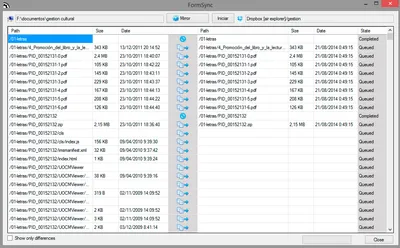
Air Explorer
Synchronize tool
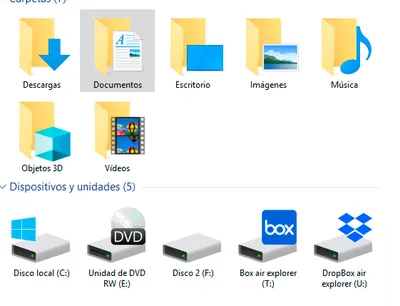
Air Live Drive
See your clouds like icons in your Explorer
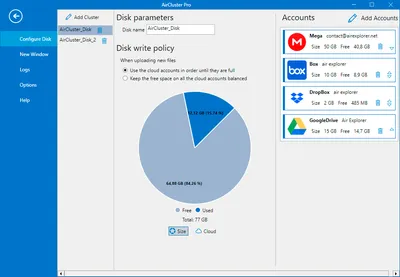
Air Cluster
Add your clouds to have more capacity
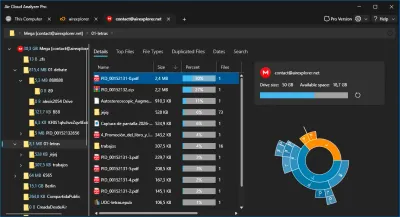
Air Cloud Analyzer
Analyze your cloud and local storage
| Tool | Focus | Best for | Key Advantage | Core Features & UX |
|---|---|---|---|---|
| Air Explorer | High-Performance Management | Massive data migrations, advanced sync (Mirror/Bidirectional), and scheduled backups. | Direct cloud-to-cloud transfers without local disk buffering. | Dual-pane interface, CLI support, and built-in Task Scheduler. |
| Air Live Drive | Seamless Disk Mapping | Accessing cloud files without syncing; working on remote docs (CAD, Photoshop) directly. | Reclaims local disk space by browsing via Windows Explorer. | Clouds appear as standard disk icons (Z:, Y:); intuitive OS integration. |
| Air Cluster | Unified Storage Pooling | Users with multiple accounts needing a single, massive storage pool. | Sums capacity across accounts (e.g., 3x15GB = 45GB cluster). | Storage Pooling Technology; automatic file distribution across accounts. |
| Air Cloud Analyzer | Storage Analysis & Cleanup | Visualizing usage and finding large, old, unnecessary, or duplicate files across clouds and local disks. | Analyzes cloud storage without downloading files, saving bandwidth and local disk space. | Sunburst charts, largest-files view, type/date filters, global search, and duplicate finder. |
Technical Comparison Matrix
| Air Explorer | Air Live Drive | Air Cluster | Air Cloud Analyzer | |
|---|---|---|---|---|
| Clouds supported | 36+ | 31+ | 26+ | 30+ and local disks |
| Synchronize tool | Yes (Advanced) | No | Yes (Cluster Sync) | No (Analysis only) |
| Scheduler tool | Yes | No | Yes | No |
| Encrypt tool | Yes | No | Yes | No |
| Interface | Dual-Pane Desktop App | Windows Explorer | Unified Volume Manager | Visual Analysis Dashboard |
Technical FAQ: Expert Guide to Cloud Solutions
What is the difference between Air Explorer and Air Live Drive?
The main difference is how you access your data. Air Explorer is a dedicated file management application for syncing and moving files between clouds. In contrast, Air Live Drive maps your clouds as local drive letters, allowing you to use remote files directly in any desktop software without a synchronization process.
What is the difference between Air Explorer and Air Cluster?
Air Explorer is a file manager that treats each cloud account as an individual destination, ideal for organizing and migrating files between them. Air Cluster, however, is a storage aggregator that merges multiple accounts into a single, unified volume. While Explorer manages files between clouds, Cluster lets you manage files inside one massive pooled cloud created from several accounts.
What is the difference between Air Explorer and Air Cloud Analyzer?
Air Explorer is designed to manage, transfer, synchronize, schedule, and encrypt files across cloud accounts. Air Cloud Analyzer focuses on storage analysis instead: it visualizes cloud and local disk usage and helps you find large, old, or duplicate files without downloading them. It analyzes your data but does not synchronize or transfer files.
How can I join multiple cloud accounts into one?
You can unify multiple cloud accounts using Air Cluster. This tool allows you to "pool" storage from different providers (or multiple accounts from the same provider) into a single large volume, making it easier to manage large datasets across fragmented free storage tiers.
Which application is best for automated backups?
Air Explorer is the recommended tool for automated backups. It features a professional Task Scheduler and a Command Line Interface that allows you to automate daily mirrors or bidirectional syncs between local servers and cloud storage.