
Small businesses rarely store all their files in one place. Over time, documents, backups, client folders, invoices, and internal records end up distributed across Google Drive, OneDrive, Dropbox, MEGA, pCloud, and other storage platforms. This fragmented setup makes it harder to find files, maintain order, and control long-term storage costs.
Many companies assume the only solution is a full cloud migration. But moving an entire digital archive to a single provider is not always the smartest option. It can be expensive, slow, and operationally disruptive. A better alternative is to centralize file management without relocating every file. With tools like Air Cluster and Air Explorer, SMEs can organize, access, and manage distributed cloud storage from a more unified environment.
Why SMEs struggle with fragmented digital archives
As a business grows, its file storage often grows in a scattered way. Different teams adopt different cloud services, old projects remain in legacy platforms, and archives accumulate without a clear strategy. The result is a disconnected digital archive that creates daily inefficiencies.
Common problems include:
- Files spread across multiple cloud storage providers.
- Duplicate documents stored in different locations.
- Limited visibility into where important files are kept.
- Slow manual transfers between accounts and platforms.
- Difficulty applying a consistent archive structure.
- Increased risk of losing track of old but valuable business data.
For a small business, this is not just an IT problem. It affects productivity, collaboration, and the ability to scale operations without creating information chaos.
Do you need to migrate everything to centralize your archive?
No, centralizing your digital archive does not require moving all files to one cloud platform.
In practice, centralization means creating a single, more efficient way to access, organize, and control files across multiple storage services. Instead of forcing a full migration, businesses can build a unified management layer on top of their existing cloud ecosystem.
This approach offers several advantages:
- Lower migration risk.
- Less disruption for employees.
- More flexibility to keep using preferred cloud platforms.
- Better control over storage distribution.
- Reduced dependence on a single provider.
For SMEs with limited time and resources, this strategy is often more realistic and cost-effective than an all-in-one cloud move.
Air Cluster: centralize cloud storage without consolidating providers
Air Cluster is a strong solution for businesses that want to unify multiple cloud storage accounts into a single storage structure. Instead of migrating everything into one provider, companies can combine different clouds and manage them as a larger, centralized storage pool.
This is particularly useful when a business has available storage spread across several accounts or providers and wants to use that capacity more efficiently.
Boost your storage with Air Cluster — Combine your clouds into one big drive
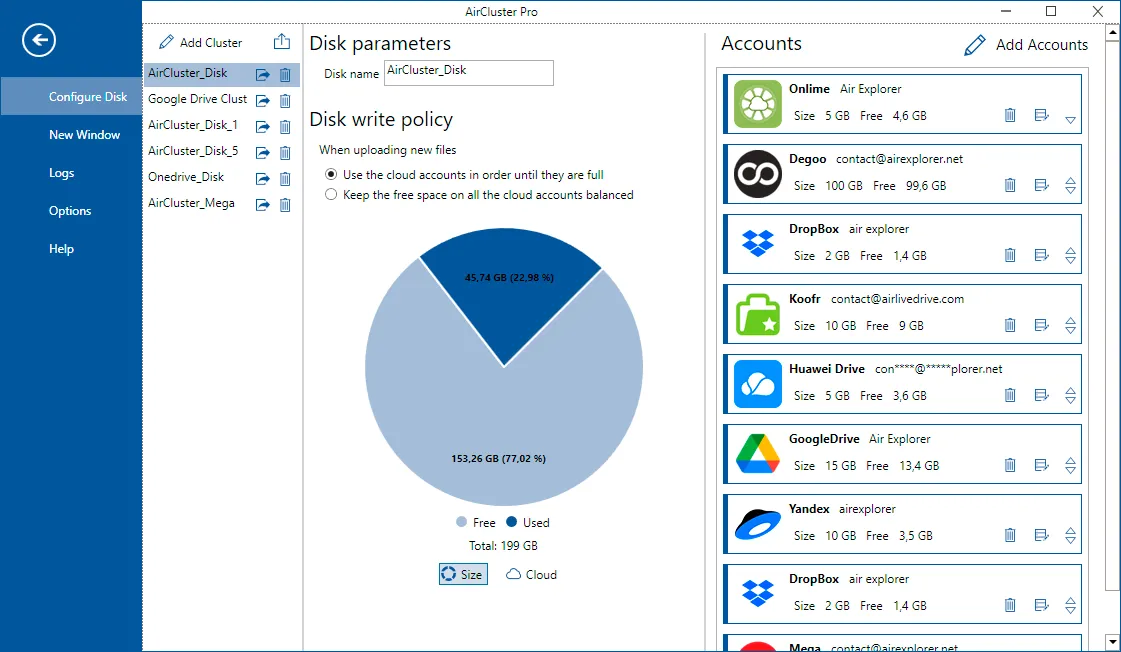
Top Benefits of Air Cluster
- Combines multiple cloud accounts into one cluster.
- Helps centralize storage without full cloud migration.
- Improves storage flexibility across providers.
- Reduces dependency on a single cloud vendor.
- Makes it easier to distribute files across different accounts.
For example, a small business may use Google Drive for team collaboration, OneDrive for Microsoft-based workflows, and Dropbox for older project archives. With Air Cluster, these services can function as part of a more unified storage system, helping the business centralize its archive strategy without changing where every file lives.
Air Explorer: manage all your cloud files from one interface
Air Explorer is ideal for businesses that need centralized cloud file management rather than storage aggregation. It allows users to connect multiple cloud storage services and manage files across them from one interface.
This is especially valuable for SMEs that want to simplify file browsing, transfers, synchronization, and archive administration without logging into several cloud platforms separately.
Get Air Explorer now — Manage all your clouds in one place
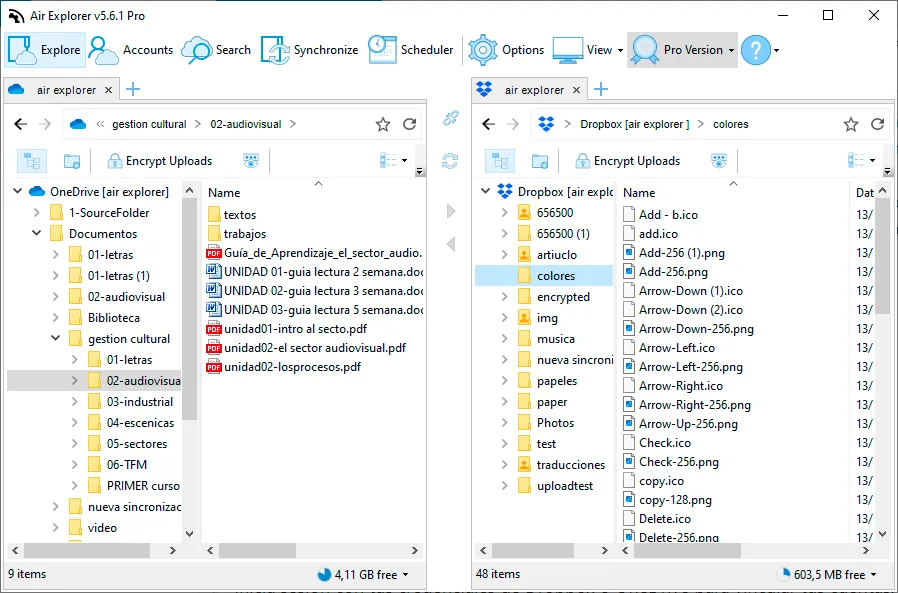
Top Benefits of Air Explorer
- Access multiple cloud storage accounts from one place.
- Transfer files between cloud services easily.
- Browse and search distributed archives more efficiently.
- Simplify cloud file management for daily operations.
- Improve visibility across a fragmented digital archive.
If a company stores contracts in OneDrive, shared assets in Google Drive, backups in MEGA, and old reports in Dropbox, Air Explorer can help bring order to that fragmented environment. Teams save time, reduce manual work, and gain more control over the archive without a complete infrastructure change.
Air Cluster vs Air Explorer: which one is better for archive centralization?
Both tools help centralize a digital archive without forcing a move to one cloud, but they solve different needs.
Choose Air Cluster if your priority is:
- Combining storage space across multiple cloud accounts.
- Creating a unified cloud storage cluster.
- Optimizing how archive data is distributed.
Choose Air Explorer if your priority is:
- Managing files across different cloud services.
- Improving access and visibility.
- Simplifying transfers, browsing, and synchronization.
In many cases, the right choice depends on whether your biggest problem is storage fragmentation or file management complexity.
How to centralize a small business archive step by step
A successful archive centralization project usually starts with visibility and structure.
1. Audit your current cloud storage
List all platforms, accounts, folders, and file types currently in use. Identify which data is active, archived, duplicated, or outdated.
2. Standardize your archive structure
Create consistent naming rules, folder logic, and retention criteria. A clean structure makes any centralization effort more effective.
3. Decide your centralization model
If you need to unify storage resources, Air Cluster is likely the better fit. If you need to manage files across different clouds more efficiently, Air Explorer may be the better solution.
4. Reduce manual cloud administration
Use tools that simplify transfers, synchronization, and archive organization. This saves time and improves consistency across teams.
5. Keep flexibility in your storage strategy
Avoid unnecessary cloud lock-in. A multi-cloud archive can be more resilient, scalable, and cost-efficient when managed properly.

Why this strategy is better for many SMEs
For many small and medium-sized businesses, a full migration is not the fastest path to order. It often adds cost and complexity before solving the real issue: lack of centralized control.
A smarter strategy is to centralize file access, organization, and archive management while keeping data in the clouds that already support the business. This reduces disruption and allows gradual improvement instead of a risky all-at-once transition.
Air Cluster and Air Explorer make that possible from different angles. Air Cluster helps businesses unify distributed cloud storage capacity, while Air Explorer helps them manage files across multiple cloud environments from one interface.
FAQs
Can a small business centralize files without migrating to one cloud?
Yes. A business can centralize file management by using tools that connect multiple cloud storage services into one operational environment, without moving every file to a single provider.
What is the difference between Air Cluster and Air Explorer?
Air Cluster focuses on combining multiple cloud accounts into a unified storage cluster. Air Explorer focuses on browsing, managing, transferring, and synchronizing files across multiple cloud services from one interface.
Is multi-cloud storage good for SMEs?
Yes, especially when businesses want flexibility, resilience, and better cost control. The key is having the right tools to avoid file fragmentation and management complexity.
What is the best way to organize a fragmented digital archive?
Start by auditing existing storage, removing duplicates, standardizing folder structures, and using a centralized tool to manage files across platforms more efficiently.